显示标签为“Cummins INSITE”的博文。显示所有博文

2018年9月19日星期三

HOW TO CHANGE ROAD SPEED PARAMETERS WITH CUMMINS INLINE 7 SOFTWARE 8.3 CUMMINS

Cummins inline 7 with  INSITE 8.3.0120 Pro software can performs engine diagnostics and displays electronic engine information..For Many buses owner are not good at how to adjust the speed as required. OBD2repair.com share you detail steps about how to change Road Speed Parameters with Cummins inline 7 Truck Software 8.3 Cummins.


NOTE: This Carolina Thomas Bus Buzz assumes you have a service department laptop with the Cummins Insite Software (official or cheap crack version confirmed to work no issues).

For Latest Cummins Inline 7 Cummins insite 8.3.0120  ,pls check

Cummins INLINE 7 Data Link Adapter Cummins Truck Scanner with Insite 8.3 Cummins

Cummins INLINE 7 Data Link Adapter Cummins Truck Scanner with Insite 8.3 Cummins


Step 1: Connect the laptop to the bus by using the 9-pin diagnostic receptacle inside every C2 located above the driver’s left foot position.

f:id:OBD2repair:20180723114457p:plain
f:id:OBD2repair:20180723114522p:plain
Step 2: Click on on your desktops Cummins INSITE Icon.

f:id:OBD2repair:20180723114533p:plain
Step 3: Turn key in bus to on position. Bus does NOT need to be running.
Step 4: Click on on “Connect to ECM” menu on left and then click on “Connect” in pop up window.

f:id:OBD2repair:20180723114700p:plain
Step 5: Click on on “Features and Parameters”.

f:id:OBD2repair:20180723114713p:plain
Step 6: Scroll down menu to Road Speed Governor and click on on icon beside to expand its options. The menu is in alphabetical order for ease of use.

f:id:OBD2repair:20180723114729p:plain
Step 7: Double click on on MPH number on MAX VEHICLE SPEED.

f:id:OBD2repair:20180723114746p:plain
Step 8: Enter the new MPH speed required and then click on on the number. Note: North Carolina has specific laws for buses in operation. Please adhere to these laws for any bus in-service.
Step 9: Double click on on MPH number on MAX ACCELERATOR SPEED and change to same value as MAXIMUM VEHICLE SPEED.
NOTE: New speed is displayed and old speed is displayed to the right.

f:id:OBD2repair:20180723114806p:plain
Step 10: On tool bar at top of screen, click on on the small computer icon to send info to engine’s ECM.

f:id:OBD2repair:20180723114818p:plain
Step 11: Pop up window will indicate you are to turn ignition key off for 30 seconds. Do this and then click on OK.

f:id:OBD2repair:20180723114832p:plain
Step 12: NEW pop up window will tell you when to turn ignition key back on. When instructed, turn key on and click on OK.
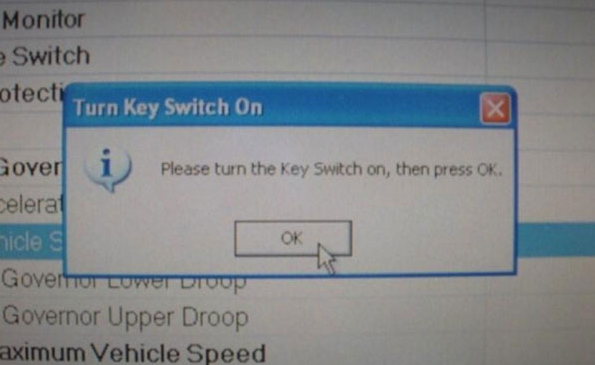
f:id:OBD2repair:20180723115000p:plain
Step 13: Pop up window will indicate when all parameters were successfully written. Click on OK.

f:id:OBD2repair:20180723115022p:plain
Step 14: Click on Icon on left to disconnect from ECM. When this is complete it is safe to remove laptop connections with bus.
f:id:OBD2repair:20180723115037p:plain


OBD2repair.com Focus On OBD Tool Since 2008
More detail about Cummins inline 7 cummins insite 8.3 software ,pls connect
Website:www.obd2repair.com
Skype:obd2repair / eobdscan1
We Chat/ Whatsapp:+86 137 2882 3163
Email: info@obd2repair.com
Facebook: www.facebook.com/obd2repaircom/

2018年8月29日星期三

Notice About Cummins Insite 8.3 Cummins Inline 7 Truck Diagnostic Tool


Cummins Inline 7 is WIFI/Bluetooth wireless connection proffesional truck scanner.INLINE 7 is fully compliant with the Technology and Maintenance Council’s RP1210 standard and supports three simultaneous CAN connections and 250k, 500k and 1M baud rates.OBD2repair.com share you important notice about Cummins Inline 7 Truck Diagnostic Tool.

Cummins INLINE 7 Data Link Adapter Cummins Truck Scanner with Insite 8.3 Cummins

Cummins INLINE 7 Data Link Adapter Cummins Truck Scanner with Insite 8.3 Cummins

1.Cummins Inline 7 pacakge software is the pro version 8.3 cummins,support online programming.

2.Inline 7 Software Authorization success can be used for 3 years, each authorization is to use 70 times,customer can authorize 1 times. "after run out of the tokens in 3 years.

3.After activation customer can not change the computer or motherboard or CPU.
 If it has changed,need to resubmit serial number to factory then customers can activate by himslef.


4.Calibration file in Inline 7 u disk can only be used for 6 months.But the software support downloading calibration file online. Customer need to search for download calibration after 6 months.


OBD2repair.com Focus On OBD Tool Since 2008

More detail about Cummins Inline 7 ,pls connect
Website:www.obd2repair.com
Skype:obd2repair / eobdscan1
We Chat/ Whatsapp:+86 137 2882 3163
Email: info@obd2repair.com
Facebook: www.facebook.com/obd2repaircom/ 

2018年6月13日星期三

Cummins Insite V8.3.0120 Pro Software Download & Install Guide

Cummins Insite software newly update to V8.3.0120 with unlimited tokens and support online programming.Cummins Insite V8.3.0120 Pro Software is much stronger than older cummins insite software.OBD2repair.com newly released cummins truck scanner Cummins Insite 8.3.0120 Pro Software.

Cummins INSITE 8.3.0120 Pro Software with Unllimited Tokens Support Online Programming

Cummins INSITE 8.3.0120 software


Cummins INSITE 8.3.0120 Pro Downlaod:


Cummins Insite V8.3.0120  Install Guide:

Operate System: Windows 7/ 8.X/10

Cummins Insite V8.3.0120 pro software can be install via remote Teamviewer or buy one HDD with all softwares installed well.If you choose the remote installation ,just follow the steps like bellow:

1.Make order one www.obd2rpeair.com
2.Connect OBD2repair.com sell (skype: eobdscan1 / email: info@obd2repair.com )
3.Send order number and Teamviewer ID password to seller
4.Waiting for engineer install
5.Finish


Focus On OBD Tool Since 2008

More detail about cummins truck scanner Cummins Insite V8.3.0120 Pro Software ,pls connect
Website:www.obd2repair.com
Skype:obd2repair / eobdscan1
We Chat/ Whatsapp (+86)13728823163
Email: info@obd2repair.com
Facebook: www.facebook.com/obd2repaircom/

2018年1月30日星期二

How to Install Cummins Insite Pro V8.2.0.184 Insite Cummins Software

Cummins Insite Pro software have newly update to Cummins Insite V8.2.0.184 Software .Insite Cummins V8.2.0.184 work for Cummins INLINE 5 Data Link Adapter /Cummins Inline 6 data link/ Nexiq etc.For some customers dont knwo where do download and how to install the Cummins Insite software.Bellow, OBD2repair.com share you Cummins Instite Pro V8.2.0.184 Cummins Insite Software Free Download & Install Guide.

Cummins INSITE 8.2.0.184 Software Pro Version with 500 Times

Cummins INSITE 8.2.0.184 Software download
Works on win7 8 10 (Win10 run as administrator)

Very Important:
Uninstall any anti-virus software programs, firewall, etc.

Detail Steps about How to Install Cummins Insite Pro V8.2.0.184 Insite Cummins Software

Step 1: setup Inline 5 driver on Win 7 32bit
This is Windows 7 32-bit.
f:id:OBD2repair:20180131122940p:plain

Open software CD
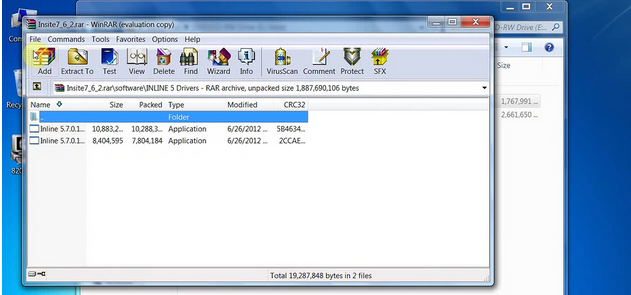
Open INSITE.7_6_2.rar-> Software folder->INSITE 5 Drivers
f:id:OBD2repair:20180131123045p:plain
f:id:OBD2repair:20180131123112p:plain


Copy and paste Inline 5.7.0.1 Setup- 32 Bit.exe on the desktop.
If you have 64-bit system, copy and paste Inline 5.7.0.1 Setup- 64 Bit.exe on the desktop
f:id:OBD2repair:20180131123138p:plain
Install the Cummins Inline5 data link adapter driver (Inline 6, Nexiq or other adapters can work too)
Run Inline 5.7.0.1 Setup-32 Bit as administrator 
f:id:OBD2repair:20180131123155p:plain


Click on NEXT
f:id:OBD2repair:20180131123232p:plain

Get windows security warning, accept it and continue setup the driver software
f:id:OBD2repair:20180131123251p:plain

Tick “Launch Inline 4/5 Reflash Tool” and click on Finish
Delete the “Inline 5.7.0.1 Setup-32 Bit on desktop
Device driver has been successfully installed
f:id:OBD2repair:20180131123309p:plain
f:id:OBD2repair:20180131123334p:plain
Open Computer->Manager->Device Manager->Universal Serial Bus Controller, to check whether the driver has been established a good communication with the computer.
f:id:OBD2repair:20180131123407p:plain
Step 2: Add Inline5 adapter to INSITE 8.2.0
Open INSITE 8.2.0.184 pro or lite version software on the desktop
f:id:OBD2repair:20180131123444p:plain
Select the option “Add New on the middle of the bottom tool bar
f:id:OBD2repair:20180131123511p:plain
Click on “Next” to install ECU Connection Wizard
f:id:OBD2repair:20180131123542p:plain
Select RP1210 adapters, click on Next
f:id:OBD2repair:20180131123556p:plain
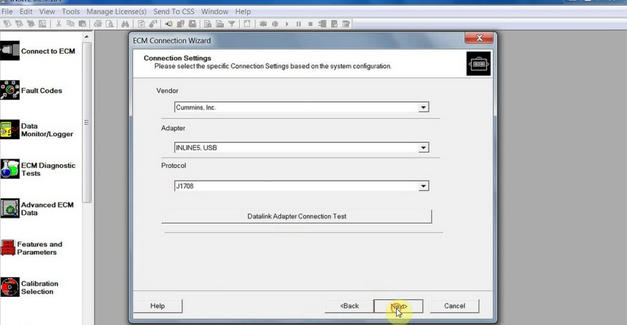
Select Vendor, Adapter INLINR 5 USB and protocol Auto detect, click on Next
f:id:OBD2repair:20180131123608p:plain

Click on Next
f:id:OBD2repair:20180131123702p:plain
Tick both 2 options and click on Finish
One more time, the software will ask to install ECU connection wizard, click on NEXT
Setting one more time and select the protocol J1708.
f:id:OBD2repair:20180131123725p:plain

Click on Finish
Setting one more time and add protocol J1939
f:id:OBD2repair:20180131123754p:plain
Click on Finish and cancel the ECU connection wizard interface
f:id:OBD2repair:20180131123810p:plain
Please add the corresponding adapter in the Insite software
f:id:OBD2repair:20180131123828p:plain

Select “INLINES USB (Auto Detect) Connection” in the middle of bottom tool bar
f:id:OBD2repair:20180131123853p:plain

Click on the “Connect” button to connect to ECM

Start to use the Insite Cummins Pro V8.2.0.184 software to read fault code, manage data logger, do calibration etc
f:id:OBD2repair:20180131123951p:plain
f:id:OBD2repair:20180131124023p:plain
f:id:OBD2repair:20180131124044p:plain


Focus On OBD Tool Since 2008

More detail about insite cummins V8.2.0.184,pls connect
Website:www.obd2repair.com
Skype:obd2repair / eobdscan1
We Chat/ Whatsapp (+86)13728823163
Email: info@obd2repair.com
Facebook: www.facebook.com/obd2repaircom/

2017年12月27日星期三

How to Install Insite Cummins 8.2.0.184 Cummins Inline 6 Crack Software on Win 10

INSITE Cummins 8.2.0.184 is the latest Cummins Inline 6 software. INSITE Cummins 8.2.0.184 Software Pro Version with 500 times Limitation and supports Multi-language.OBD2repair.com share you detail steps about how to install Insite Cummins 8.2.0.184 Cummins Inline 6 Crack Software on win 10.


Insite Cummins 8.2.0.184 Cummins Inline 6 Crack Software


How to Install Insite Cummins 8.2.0.184 Cummins Inline 6 Crack Software on Win 10


More detail about Insite Cummins 8.2.0.184 Cummins Insite software,pls connect
Website:www.obd2repair.com
Skypeobd2repair / eobdscan1
We Chat/ Whatsapp (+86)13728823163
Email: info@obd2repair.com

Facebook: www.facebook.com/obd2repaircom/

2017年5月18日星期四

Difference among Cummins INSITE Basic,INSITE Lite and INSITE Pro

Cummins INSITE 8.1.1.199 is the latest cummins insite software.Cummins INSITE works for many heavy truck diagnostic tools.There are 3 versions of Cummins software.OBD2repair.com share you the difference among Cummins INSITE Basic,INSITE Lite and INSITE Pro following.

Cummins INSITE 8.1.1.199 Software Lite Version with 500 Times


Cummins INSITE 8.1.1.199 Software Compatible with Following hardware:

1.Cummins INLINE 6 Data Link Adapter
2.Cummins INLINE 5 Data Link Adapter
3.DPA5 Dearborn Protocol Adapter 5 Heavy Duty Truck Scanner
4.NEXIQ USB Link
5.XTruck USB Link
6.AUGOCOM H8 Truck Diagnostic Tool 


Cummins INSITE Basic vs. INSITE Lite vs. INSITE Pro Version
FUNCTIONALITY LEVELINSITE SIMULATOR Cummins INSITE BASIC Cummins INSITE LITE INSITE RSGR/ INDUSTRIAL PRO Cummins INSITE PRO
FeaturesNo License Required/ No Live ECM ConnectionRead Only ECM AccessNo Calibration DownloadNo Calibration Download/Limited Special Features and Diagnostic TestsFull Functionality
View Trip Information 
View Fault Trees 
Fault Information System 
View Troubleshooting Steps 
View Parameter Settings 
View Wiring Diagrams 
View Engine Dataplate 
Driver Rewards 
Data Monitor/Logger 
Reset Trip Information  
Reset and Clear Fault Codes  
Set Engine Features (on/off)  
Set/Adjust Parameters  
Set/Change ECM Passwords  
Create Settings Templates  
Create Work Orders/Jobs  
ZAP-It Functionality  
Run Special Features  Limited
Run Diagnostic Tests  Limited
Read/Retrieve Calibration Files   Industrial/HHP Products Only
Load Engine and Programable Datalink Device Calibrations   Industrial/HHP Products Only
   
In summary,
Cummins INSITE Lite, INSITE RSGR/Industrial Pro and INSITE Pro are subscription programs, with automatic shipment of software updates available through the Cummins Inc. Update Manager. It provides subscribers with the latest in features, functions and new engine support.

INSITE Basic is offered as a license valid for five years without updates.


This article is compeleted by OBD2repair.com ,More question ,pls connect:
Website:www.obd2repair.com
Skype:obd2repair / eobdscan1
Whatsapp (+86)13728823163
Email: info@obd2repair.com
https://cn.linkedin.com/in/obd2repair01
Facebook: www.facebook.com/obd2repaircom/ 

Can Clip Renault V 188 Can Clip Software Free Download on Mega

Renault Can Clip is   the professional diagnostic tool for Renault with multi-language.For Renault clip diagnostic tool software support upd...