显示标签为“VPECKER”的博文。显示所有博文

2018年2月5日星期一

Vpecker E4 OBD2 Scanner Universal AUTO Diagnostic Tool Software Update Guide


VPECKER E4 Android Phone OBD2 scanner is the universal diagnostic tool can be updated  online. VPECKER E4 car diagnostic tool functions cover ABS Bleeding/Battery/DPF/EPB/Injector/Oil Reset/TPMS..OBD2repair.com share you detail steps about how to Update and Install Bluetooth VPECKER E4 OBD II Scan Tool Software.

Bluetooth VPECKER E4 Phone Version Android Full System OBD II Scan Tool
What about new about Bluetooth VPECKER E4 OBD II Scan Tool Software v5.0

1, Optimize UI display.
2, Fix some bugs.
3, Improve diagnostic capabilities and communication layer stability.
4, New model software update reminder.
5, Optimization of diagnostic data flow interface interaction.
6, New freeze data stream refresh function.
7, Add history reminder for diagnostic menu click.

 How to Update Bluetooth VPECKER E4 OBD II Scan Tool Software to Vpecker E4 5.0
Then you are supposed to upgrade VPECKER E4 Tablet, here you can go to install in 3 steps.
Steps:
1, Please click Settings-OS Version in the main interface of VPECKER E4.
2, Please click
f:id:OBD2repair:20180201155933p:plain

f:id:OBD2repair:20180201155950p:plain
f:id:OBD2repair:20180201160002p:plain
Please wait for the upgrade package to download. After complete, the tablet will
automatically start VPECKER E4 installation interface, please follow the guide to
install.

3, Please click “Install”.
f:id:OBD2repair:20180201160016p:plain
f:id:OBD2repair:20180201160029p:plain
OBD2repair.com Note:
After installation, please log in IDUTEX Store to re-download all car software.
Focus On OBD Tool Since 2008

More detail about vpekcer E4 OBD 2 scanner ,pls connect
Website:www.obd2repair.com
Skype:obd2repair / eobdscan1
We Chat/ Whatsapp (+86)13728823163
Email: info@obd2repair.com
Facebook: www.facebook.com/obd2repaircom/

2017年12月26日星期二

VPECKER E4 Phone Version Android OBD II Scan Tool User Manual Download

VPECKER E4 Phone Version is Android system based universal OBD II scan tool.Bluetoth VPECKER E4 Phone auto scanner with multi language and support one key update online.OBD2repair.com share you VPECKER E4 Phone Version Android Vpecker scanner OBD II scan tool User Manual Download.

Bluetooth VPECKER E4 Phone Version Android Full System OBD II Scan Tool


Vpecker E4 Android Function List: 

Quick Test
Read ECU Info.
Read DTCs
Erase DTCs
Clear learning value
Data Stream
Actuations
Read freeze frame data
Read/Write VIN
Basic Reset
Control unit adaptations
Throttle adaptations
Air bleeding
Level calibration
Theft alarm Reset
Key programming
Oil change, Idle speed learning
Idle speed Adjustment
Ignition timing adjustment
Camshaft timing control learning
Maintenance functions
ECU Initial startup

ECU initialization 

VPECKER E4 Phone Version Android OBD II Scan Tool User Manual Download


More detail about  VPECKER E4 Vpecker scanner Android OBD II Scan Tool,pls connect
Website:www.obd2repair.com
Skype:obd2repair / eobdscan1
We Chat/ Whatsapp (+86)13728823163
Email: info@obd2repair.com
Facebook: www.facebook.com/obd2repaircom/

2017年11月27日星期一

Vpecker E4 APK Software & Vpecker E4 User Manual Free Download

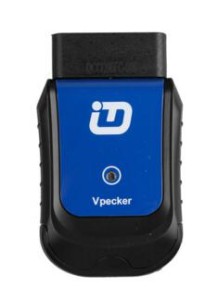
Vpecker E4 is 2017 latest universal diagnostic and programming tool.Vpecker E4 coding tool support more than 78 cars of US domestic brands, European, Asian, Australian and Chinese vehicles.Some customers may want the Vpecker E4software and user manual to test to check whether it worth to buy..


VPECKER E4 WIFI Android Tablet Diagnostic & Programming Tool Multi Functional


OBD2repair.com Vpecker E4 APK Free Download:

Kindly note: The Vpecker E4 only work well for Vpecker E4.
If you are using Vpecker E4 tablet diagnostic scanner, please have a try the VP_E4_EN_20171028_V4.4 android package, I upload on the mega.

1. Download
2. use your Android phone to communicate with Vpecker E4 Android scanner, then access to the vehicle to perform diagnosis whenever and wherever.

Vpecker E4 Android Version User Manual:


OBD2repair.com Vpecker E4 Android version for sale

More  detail about Vpecker E4 Android Vpecker Tablet diagnostic Scanner, just contact us freely
Website:www.obd2repair.com
Skype:obd2repair / eobdscan1
We Chat/ Whatsapp (+86)13728823163
Email: info@obd2repair.com
Facebook: www.facebook.com/obd2repaircom/ 
.

2017年9月11日星期一

Difference Between Vepcker Easydiag WIFI and Bluetooth Car Diagnostic Scanner

VPECHER Easydiag wireless V8.1 is the 2017 hot sell universal car diagnostic scanner. Vpecker Easydiag car diagnostic scanner have Bluetooth and Wifi two version. Do you know what is the difference between Vepcker Easydiag WIFI and Bluetooth car diagnostic scanner ?


VPECKER Easydiag OBDII Full Car Diagnostic Scanner
Item No. Vpecker Easydiag WiFi  Vpecker Easydiag Bluetooth 
Apparence  vpecker-easydiag-v8_1-300x208  vpecker-easydiag-v8_1-bluetooth-218x300
Price US$149 US$139 (cheaper)
WIF YES NO
Bluetooth NO YES
Version EasyDiag v8.1 EasyDiag v8.1
Operating system Windows XP, win7, win8, win10 Windows XP, win7, win8, win10
Languages 25 languages 25 languages
English, Italian, Japanese, German, Russian, French, Spanish, Portuguese, Polish,Turkish, Dutch, Hungarian, Korean, Czech, Arabic, Indonesian, Persian, Thai, Vietnamese, Finnish, Swedish, Romanian, Bosnian, Chinese (Simplified), English, Chinese (Traditional), etc.
Update Free update online lifetime Free update online lifetime
Diagnosis YES. Wireless full diagnosis YES. Wireless full diagnosis
ECU Programming YES YES
Special functions NO YES.
Both Wireless Vpecker and Vpecker Bluetooth support special function like Battery configuration, ABS Bleeding, EPB, Oil Reset, TPMS
Warranty 2 years 2 years
Conclusion Vpecker (sp247) and Vpecker (sp247-b) only differs in terms of Bluetooth and WiFi.Also, Bluetooth Vpecker is much cheaper than the wireless version.
Wi-Fi version vs Bluetooth version
Bluetooth and WiFi are different standards for wireless communication.
Bluetooth technology is useful when transferring information between two or more devices that are near each other when speed is not an issue, such as telephones, printers, modems and headsets. It is best suited to low-bandwidth applications like transferring sound data with telephones (i.e. with a Bluetooth headset) or byte data with hand-held computers (transferring files) or keyboard and mice.
Wi-Fi is better suited for operating full-scale networks because it enables a faster connection, better range from the base station, and better wireless security (if configured properly) than Bluetooth.

VPECKER Easydiag v8.1, which version better for diagnosis? Please refer the chart below for more specification to make a decision.

Bluetooth WiFi
Frequency 2.4 GHz 2.4, 3.6, 5 GHz
Cost Low High
Bandwidth Low ( 800 Kbps ) High (11 Mbps )
Specifications authority Bluetooth SIG IEEE, WECA
Security It is less secure Security issues are already being debated.
Primary Devices Mobile phones, mouse, keyboards, office and industrial automation devices. Activity trackers Notebook computers, desktop computers, servers, TV, Latest mobiles
Hardware requirement Bluetooth adaptor on all the devices connecting with each other Wireless adaptors on all the devices of the network, a wireless router and/or wireless access points
Range 5-30 meters With 802.11b/g the typical range is 32 meters indoors and 95 meters (300 ft) outdoors. 802.11n has greater range. 2.5GHz Wi-Fi communication has greater range than 5GHz. Antennas can also increase range.
Power Consumption Low High
Ease of Use Fairly simple to use. Can be used to connect upto seven devices at a time. It is easy to switch between devices or find and connect to any device. It is more complex and requires configuration of hardware and software.
Latency 200ms 150ms
Bit-rate 2.1Mbps 600 Mbps


2017年7月10日星期一

2017 New Vpecker India OBD2 Scanner for Tata/Maruti/Mahindra Vehicle List


WIFI VPECKER EASYDIAG India Version OBD2 Scanner For Tata/Maruti/Mahindra. VPECKER Easydiag many diagnostic function such as read ECU info,read DTC,clear DTC,live data,active test,etc.OBD2repari.com share you  VPECKER EASYDIAG India Vpecker India detail Vehicle list.

WIFI VPECKER EASYDIAG India Version OBD2 Scanner For Tata/Maruti/Mahindra


VPECKER  India TATA Car List:


VPECKER  India Maruti Car List:


VPECKER  India Mahindra
Car List:


More detail of Vpecker India OBD2 Scanner,pls connect,

Skype:obd2repair / eobdscan1
Whatsapp (+86)13728823163

Email: info@obd2repair.com


Can Clip Renault V 188 Can Clip Software Free Download on Mega

Renault Can Clip is   the professional diagnostic tool for Renault with multi-language.For Renault clip diagnostic tool software support upd...