2017年9月28日星期四

VAS PC VAS 6154 VAG Diag Interface ODIS VW V4.1.3 Test Report


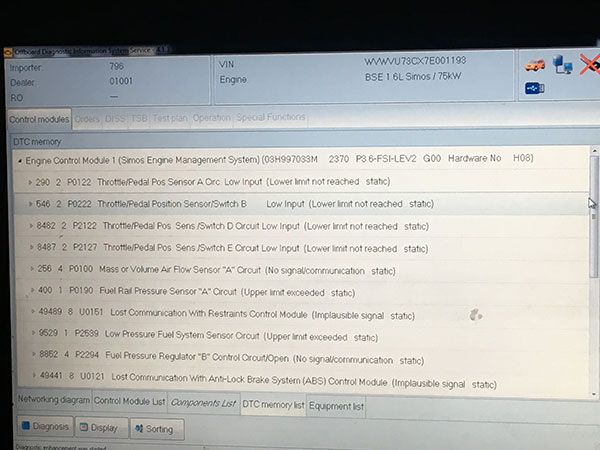
VAS 6154 interface with ODIS VW V4.1.3 is the latest  vag diag. Some customers may doubt that is it worth to buy the vas 6154.Is it work well and stable? OBD2repair.com share you VAS PC VAS 6154 Interface ODIS VW V4.1.3 Test Report  following.


WIFI VAS 6154 ODIS VW 4.1.3 VAG Diagnose Interface Replace VAS 5054A


VAS PC VAS 6154 Interface ODIS VW V4.1.3 Test Report 


More detail about vas PC vas 6154 ODIS Vw V4.1.3,pls connect
Website:www.obd2repair.com
Skype:obd2repair / eobdscan1
We Chat/ Whatsapp (+86)13728823163
Email: info@obd2repair.com
Facebook: www.facebook.com/obd2repaircom/ 

2017年9月27日星期三

How to Write a File to A Car with EDC17CP14 Through OBD with Kess v2 Master

Kess v2 master kess v2 clone is the ecu remapping tool for multi brand cars. Kess V2 V5.017 Clone with no
token limited and support work online.OBD2repair.com share you How to Write a File to A Car with EDC17CP14 Through OBD with
 Kess v2 Master Kess V2 Clone.

Kess v2 Master Kess V2 Clone V5.017 with K suit 2.23 Support Online with Unlimited Tokens
Kess V2 Master Kess V2 V2.23 FW 5.017 Unlimited Tokens with Reset Button


Car ECU:  VW Passat 2.0cr CBAB edc17cp14
 
Procedure: 
I read the original file through OBD, and wrote it back again with no problems. 
 
Afterwards i have put the ECU to boot mode with kess tricore module, where i have made a ackup file read and a normal read
 
Result: 
 
Failed and the car won’t start. 
Properly it is Tprot locked. 
 
Solution: 
The car can now start again..
A great thanks to all you helpfully people. It is nice to get qualified help when I fuck things up.
I wrote the fixed iRom file from @stabilo in boot mode, and tried start the car, that did not work.
Then I tried to follow the last three steps in the guide from another thread:
=================================================================
Problem: ECU VAG EDC17CP04/14 blocked writing MOD by OBD (so called EEPROM crash) with kess v2 clone
caused by: ECU remain in programming mode.
1. Read IROM / XROM and EEPROM in bootloader mode.
2. Fix IROM/XROM using bootloader readout and OBD ORI readout (you will probably need to paste part of map zone and chk/RSA zone)
3. Write fixed IROM/XROM by bootloader (do not touch EEPROM!)
4. connect ECU to the car and write repaired IROM/XROM (same used for bootloader) by OBD.
It will automaticaly fix eeprom problem.
Resolved
=======================================================================
That gave me success, and the car can start again.
Thank you all for helping me solve my problem.
 
 
Good info:  
 
this ecu (edc17cp14) don’t flash over obd port.also cmd cant do it.beleive me i have test it.
in boot mode no problem.
i can offere original state 9977 full backup.or only the mpc file.
or very good eco tun 35PS/60nm
read out by kess v2 clone.
1 .part you have done(backup with ktag your data) eeprom
2.need whrite mpc and test starts you car or not.
if not write first my full backup to you ecu. after this write only your eeprom file back.
after this your car will 100% starts.
 
i have done this car two years ago in boot mode.with old state(older version)
after the vw skandal update i have try with cmd do it over obd port.
but this not possible shows cmd .
with  kess v2 clone no problem. but only in bootmode.
here 9977 original mpc file in boot mode.
try and report.i think it will work for you
(original not tuned)
no pass as allways here.
 
More detail about Kess V2 master kess v2 clone ,pls connect

Website:www.obd2repair.com
Skype:obd2repair / eobdscan1
We Chat/ Whatsapp (+86)13728823163
Email: info@obd2repair.com
Facebook: www.facebook.com/obd2repaircom/ 
 

2017年9月20日星期三

Original Plan MB Star C5 VS. Common Mb Star C5 VS. MB Star C4

Mercedes Star Diagnostic Tool is the best diagnostic and programming tool for benz. But do you know what is the difference among hot sell MB Star C4/C5? Which to choose? OBD2repair.com share you the comparison of the Original Plan MB Star C5, Common MB Star C5 and Mb Star C4 following.

Original MB Star C5 Mercedes Star Diganose Support DOIP


What‘s the different Among Original Plan MB Star C5 ,Common MB Satr C5 &  MB Star C4?

1.Original MB Star C5 is 1:1 Original Clone SDConnect support DoiP for W222,support software update.

2.Common MB Star C5 in the market is MB Star C4 inside with C5 case, all same as MB Star C4 and do not support DoiP

3.MB Star C4 do not support DoiP


OBD2repair.com DOIP MB Star C5 PCB Board Display:


More detail about Mercedes Star Diagnositc MB Star C5,pls connect
Website:www.obd2repair.com
Skype:obd2repair / eobdscan1
Whatsapp (+86)13728823163

Email: info@obd2repair.com

2017年9月19日星期二

OP COM Opel Firmware OP COM V1.95 VS.OP COM Opel V1.70 VS.OP COM Opel V1.65

Opel Diagnose FW V1.95 is the latest OP COM interface .New OP COM with software 2014V and work better than older version. OBD2repair.com share you the comparison about  OP COM Opel Firmware OP COM V1.95 VS.OP COM Opel V1.70 VS.OP COM Opel V1.65.

Opcom OP Com Opel Firmware V1.95 Software 2014V Can OBD2 for Opel


 What is the difference among OP COM Opel FW V1.95 ,OP COM Opel V1.7 ,OP COM Opel V1.65 ,OP COM Opel V1.45

OP COM Opel Firmware V1.95 PCboard Show
OP COM Opel Firmware V1.7 PCboard Show

OP COM Opel Firmware V1.65 PCboard Show


Actually, all versions of opcom mainly differ from each other in the PCB design and the program. The other aspects are the same.

Price: $18- $23

opcom firmware V1.95 from obd2repair is the most expensive. And the lower firmware version, the cheaper the price.

VAUX-COM Software: the Same

VAUX-COM_120309a is compatible with opcom firmware 1.95, opcom firmware V1.7, opcom 1.65, opcom 1.59 and opcom 1.45.

In another word, all versions of opcom perform the same function: 

read out and clear fault codes, read live data and perform output test. Also, print out, save, or copy the fault codes to any other application. And measure block information on many control modules & show 8 measuring block parameter simultaneously.

VAUX-COM_120309a Download:

http://www.mediafire.com/file/yks663q9gk...20309a.zip

Or:

OBD2repair.com Op com opel Firmware 1.95 New Program 2014v VAUX-COM 120309a download: 

https://mega.nz/#!sPBnlZqT!vzaV6dx66ol0Y...EtmuXWeOFc

(Crack, No pass, No need to active, No virus)

Operation system: the Same XP & windows7

OBD2repair.com OP COM Installing tips:


1) dotnetfx35_SP1 patch must be installed on Win 7, otherwise the software will not run properly

2) Open software as Administrator; check the installation video in CD first

Unable to Update firmware: The Same
opcom crack can’t update online, otherwise it will be damaged.

No need active: The same

Workable Opel models: the same
opcom is compatible with almost all Opel cars, incl. new cars with CAN-BUS based diagnostic, such as Vectra-C, Astra-H, Zafira-B.

Workable control units: The same

Works on many control units, like Engine, Automatic Transmission, ABS, Airbag, Engine Cooling module, Instrument Cluster, Electronic Climate Control, Body Control Unit, etc.


More detail about OP COM OPEL,pls connect

Website:www.obd2repair.com
Skype:obd2repair / eobdscan1
Whatsapp (+86)13728823163
Email: info@obd2repair.com

Facebook: www.facebook.com/obd2repaircom/ 


2017年9月14日星期四

Volvo Tech Tool vs. Dev2tool vs. Visfeed Which to Choose ?


Volvo Tech Tool, Dev2tool and Visfeed all are software for Volvo/Mack/Renault/UD vocom trucks.
But do you know the difference and which to choose? OBD2repair.com will share you 
difference among volvo diagnostic software Volvo Tech Tool, Dev2tool and Visfeed.
 
Volvo tech tool Volvo PTT : for diagnosis
dev2tool: for programming
Visfeed: for reprogramming
 
For details, here you go.
 
What is Volvo tech tool:
 
OEM Diagnostic Tool. Premium Volvo Tech Tool (Volvo PTT) is a Windows-based diagnostic application specially designed to test, calibrate and program engine parameters.
 
Read / Interpret Fault Data
Extensive Diagnostic Tools
Facilitates Update Process
Clear all diagnostic trouble codes including emissions related ReGen codes.
Volvo Tech Tool software will communicate with trucks below, with the proper interface device like Volvo Vocom 88890300 or Volvo VCADS
 
Volvo Trucks (Older electrical system, Vehicle electronics ’98, VERSION2, VERSION3, VERSION4)
Volvo Trucks (VERSION4 – FH4/FM4);
Volvo Buses (Conventional, Multiplexed, Multiplexed version 2, Multiplexed version 3)
Volvo Construction Equipment
Volvo Penta (VERSION2, VERSION3)
Volvo OEM Component Customer (VERSION2, VERSION3);
Mack Trucks (V-MAC I/II/III ITC, V-MAC IV, V-MAC IV+)
Renault Trucks (VERSION2, VERSION3, VERSION4);
UD Trucks (VERSION2, VERSION3, VERSION4)
 
Note: the latest Volvo Tech Tool: version 2.5.86 

 
What is dev2tool:
 
Special tool to access and program parameters at any level without restriction;
• Used primarily for program: speed limit, change CHASSIS ID, immobilizer neutralization;
• Change minimum / maximum values of parameters, for example: increase speed limit;
 
with dev2tool, you have access to all levels(specially level 2) parameters
Dev2tool will give you access to over 11000 parameters! This is correct!
The only problem is that you truck DOES NOT have 11000 parameters.
I got dev2tool and I’ve tried to disable the egr on a 16L volvo engine (volvo D16D US model).
As I said with dev2tool you will see for example a parameter called “EGR Axis” but the ECU on the truck DOES NOT have that parameter in any programming levels.
Pretty much is not possible to disable unless you will find somebody (tuning company) that can reprogram your whole dataset on the engine ECU.
 
Note: the explanation of the parameters for Volvo trucks
 
That parameter HJM (level 5) it is only into PTT database. The ECU on Volvo trucks (US Model) does NOT have that parameter.
Anyway even if exist is not possible to change it because it is level 5.
You can change the value of that parameter but when you turn on the engine it will get back to it’s original value.
Level 5 is only function test, freeze frame data ….
I’ve tried already some level 5 to reprogram but NOPE … not working.
 
Note: Dev2tool for Tech Tool for parameter programming on new trucks FM4/FH4
 
Some of option
• Chassis ID Change.
• Immobilizer ON/OFF.
• Injector programming.
• Speed Limit programming.


What is Visfeed:
 
Small Database Flash files.
 
It works as a Special tool to encrypt/decrypt/edit intermediate storage files for ADVANCED Volvo Trucks Diag users.
With this tool you have this interesting options:
• AdBlue OFF.
• Convert EUR3 to EUR5.
• EGR OFF.
• NOx Torque Reduction OFF.
 
The Tool is made to make all file rebuilding process as simple and easy as possible. It also allows to view ECU file and other information of part and sub part numbers, parameters, PID, PPID, SID, PSID, FMI. Checksum calculation possible of Intel HEX line and whole CSW file. For portability USB key included
More detail about volvo tech tool ,pls connect
Website:www.obd2repair.com
Skypeobd2repair / eobdscan1
Whatsapp (+86)13728823163
Email: info@obd2repair.com
Facebook: www.facebook.com/obd2repaircom/

2017年9月11日星期一

Difference Between Vepcker Easydiag WIFI and Bluetooth Car Diagnostic Scanner

VPECHER Easydiag wireless V8.1 is the 2017 hot sell universal car diagnostic scanner. Vpecker Easydiag car diagnostic scanner have Bluetooth and Wifi two version. Do you know what is the difference between Vepcker Easydiag WIFI and Bluetooth car diagnostic scanner ?


VPECKER Easydiag OBDII Full Car Diagnostic Scanner
Item No. Vpecker Easydiag WiFi  Vpecker Easydiag Bluetooth 
Apparence  vpecker-easydiag-v8_1-300x208  vpecker-easydiag-v8_1-bluetooth-218x300
Price US$149 US$139 (cheaper)
WIF YES NO
Bluetooth NO YES
Version EasyDiag v8.1 EasyDiag v8.1
Operating system Windows XP, win7, win8, win10 Windows XP, win7, win8, win10
Languages 25 languages 25 languages
English, Italian, Japanese, German, Russian, French, Spanish, Portuguese, Polish,Turkish, Dutch, Hungarian, Korean, Czech, Arabic, Indonesian, Persian, Thai, Vietnamese, Finnish, Swedish, Romanian, Bosnian, Chinese (Simplified), English, Chinese (Traditional), etc.
Update Free update online lifetime Free update online lifetime
Diagnosis YES. Wireless full diagnosis YES. Wireless full diagnosis
ECU Programming YES YES
Special functions NO YES.
Both Wireless Vpecker and Vpecker Bluetooth support special function like Battery configuration, ABS Bleeding, EPB, Oil Reset, TPMS
Warranty 2 years 2 years
Conclusion Vpecker (sp247) and Vpecker (sp247-b) only differs in terms of Bluetooth and WiFi.Also, Bluetooth Vpecker is much cheaper than the wireless version.
Wi-Fi version vs Bluetooth version
Bluetooth and WiFi are different standards for wireless communication.
Bluetooth technology is useful when transferring information between two or more devices that are near each other when speed is not an issue, such as telephones, printers, modems and headsets. It is best suited to low-bandwidth applications like transferring sound data with telephones (i.e. with a Bluetooth headset) or byte data with hand-held computers (transferring files) or keyboard and mice.
Wi-Fi is better suited for operating full-scale networks because it enables a faster connection, better range from the base station, and better wireless security (if configured properly) than Bluetooth.

VPECKER Easydiag v8.1, which version better for diagnosis? Please refer the chart below for more specification to make a decision.

Bluetooth WiFi
Frequency 2.4 GHz 2.4, 3.6, 5 GHz
Cost Low High
Bandwidth Low ( 800 Kbps ) High (11 Mbps )
Specifications authority Bluetooth SIG IEEE, WECA
Security It is less secure Security issues are already being debated.
Primary Devices Mobile phones, mouse, keyboards, office and industrial automation devices. Activity trackers Notebook computers, desktop computers, servers, TV, Latest mobiles
Hardware requirement Bluetooth adaptor on all the devices connecting with each other Wireless adaptors on all the devices of the network, a wireless router and/or wireless access points
Range 5-30 meters With 802.11b/g the typical range is 32 meters indoors and 95 meters (300 ft) outdoors. 802.11n has greater range. 2.5GHz Wi-Fi communication has greater range than 5GHz. Antennas can also increase range.
Power Consumption Low High
Ease of Use Fairly simple to use. Can be used to connect upto seven devices at a time. It is easy to switch between devices or find and connect to any device. It is more complex and requires configuration of hardware and software.
Latency 200ms 150ms
Bit-rate 2.1Mbps 600 Mbps


2017年9月4日星期一

How to Read & Write ECU with New Genius OBD ChipTuning Tool

New Genius & Flash Point K-Touch K Touch is the hand held OBD Chiptuning tool.  Multi-language New Genius supports CAN-BUS, KWP and J1850 Protocols and allow  reading / programming the ECU in modern vehicles over OBD2.  Bellow OBD2repair.com share you detail steps about how to read and write ECU with New Genius K-touch OBD Chiptuning tool.

Kess V2 update New Genius Flash Point OBD ChipTuning Tool Genius Touch Map Device
Kess V2 update New Genius chip tuning tool Genius Touch Map Device
You should have:

John Deere L21-L33 cable
f:id:OBD2repair:20170904151231p:plain

New Genius OBD Chiptuning Tool:

( it’s genuine, but maybe you can have a try with china clone New Genius K-Touch OBD Chiptuning Tool)

f:id:OBD2repair:20170904151215p:plain

How-to: New Genius OBD Chiptuning Tool flash a ECU on the table

Step 1
After removing the ECU from the tractor, wait for 2-3 minutes before you start the operation

Step 2
IMPORTANT: ignition must be off

f:id:OBD2repair:20170904151152p:plain
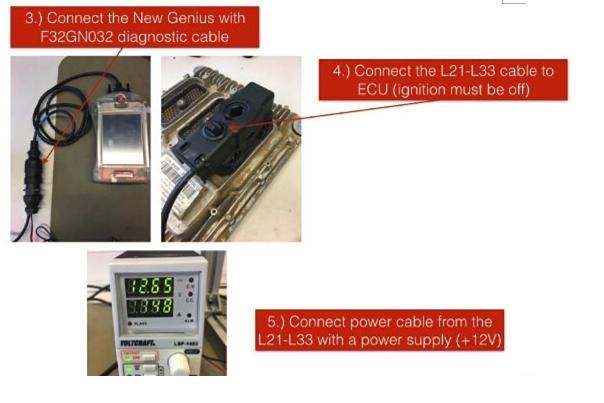
Step 3
Connect the New Genius with F32GN032 diagnostic cable

Step 4
Connect the L21-L33 cable to the ECU (ignition must be off)

Step 5
Connect the power cable from the L21-L33 with a power supply (+12V)

f:id:OBD2repair:20170904151133p:plain
Step 6
Select the correct vehicle and protocol FLASH_363

IMPORTANT: select TOOL to read at first the injector codes. For more info about this, take it from the Flashpoint Application list.

f:id:OBD2repair:20170904151113p:plain
Step 7
After reading the injector codes successfully, start to read the ECU

OBD2repiar.com IMPORTANT INFORMATION ABOUT THE PROCEDURE:

If the New Genius OBD Chiptuning Tool writes ECU, switch off the ignition, switch it off and wait until the Ampere cool down ca. 0.35A, before you click on OK on the New Genius! (cool down time ca. 10 sec)

Ignition OFF ca. 0.34-0.35 Ampere
Ignition ON ca. 1.10-1.20 Ampere

Reading ca. 50 sec.
Writing ca. 1min 50sec.

f:id:OBD2repair:20170904150814p:plain
OBD2repair.com VERY IMPORTANT NOTE:
Usually, New Genius OBD Chiptuning clone (also named Ktouch) can work as the original.
But if you decide to have a clone, you’d better read the post

“Difference Between New Genius original & New Genius K-touch China Clone”
http://obd2repair01.hatenablog.com/entry/2017/09/04/171041

More detail about New Genius OBD Chiptuning tool ,pls check:
Website:www.obd2repair.com
Skype:obd2repair / eobdscan1
Whatsapp (+86)13728823163

Email: info@obd2repair.com

Can Clip Renault V 188 Can Clip Software Free Download on Mega

Renault Can Clip is   the professional diagnostic tool for Renault with multi-language.For Renault clip diagnostic tool software support upd...